Give every customer a proper self-service portal of their own.
Each customer gets their own branded login workspace. View jobs, request work, approve quotes, pay invoices, search documents, upload files, and message your team - all without chasing you for an update.
30-day free trialTakes under a minuteIncluded in all plans
why it helps
setup in minutes
How it works
From first login to completed work, the portal becomes the customer-facing workspace for the whole relationship.
Invite the customer
Enable portal access and your customer gets their own secure login - no shared one-time links.
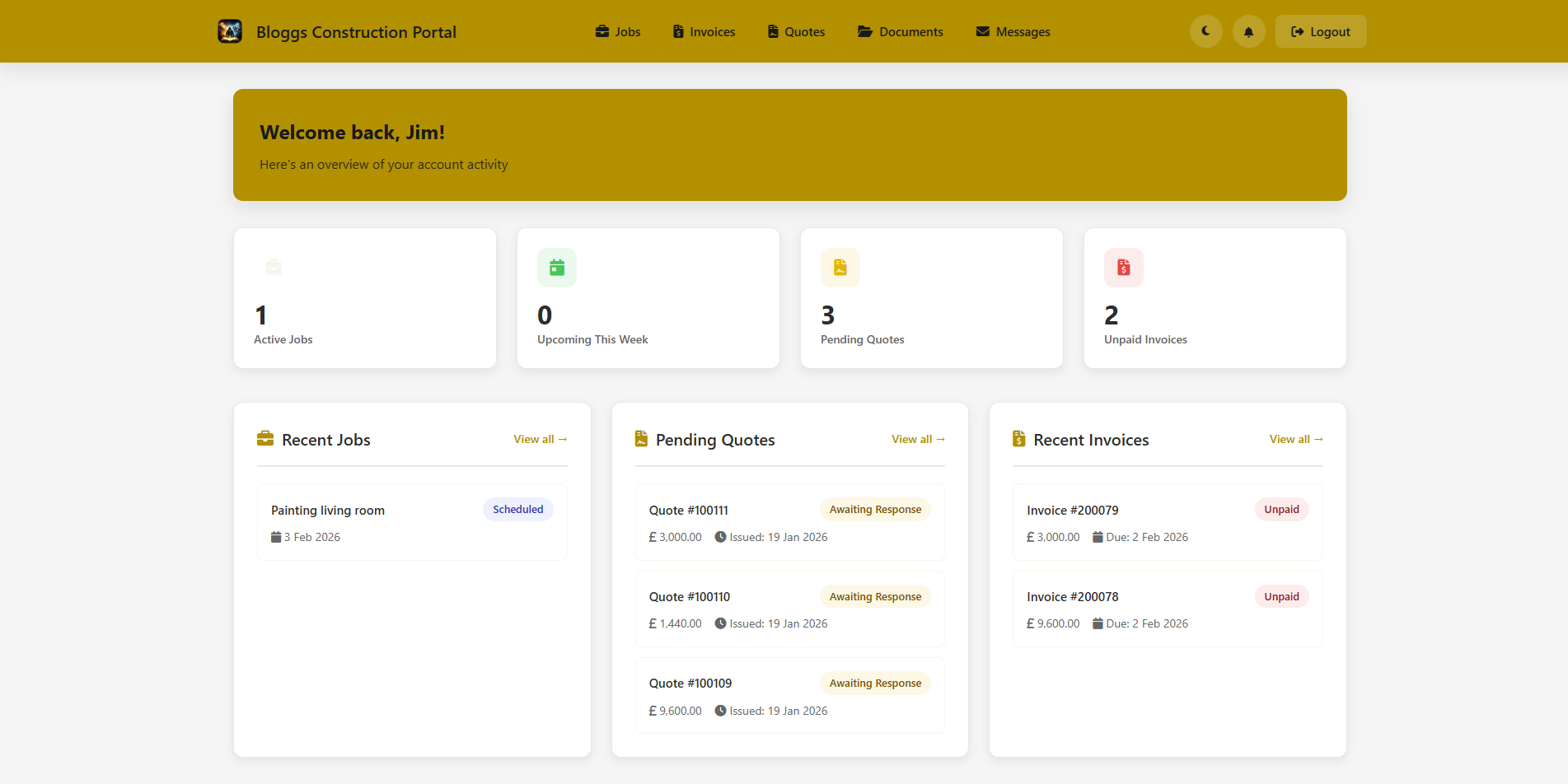
They land on a real dashboard
They see active jobs, upcoming work, pending quotes, unpaid invoices, and recent activity at a glance.
They take action
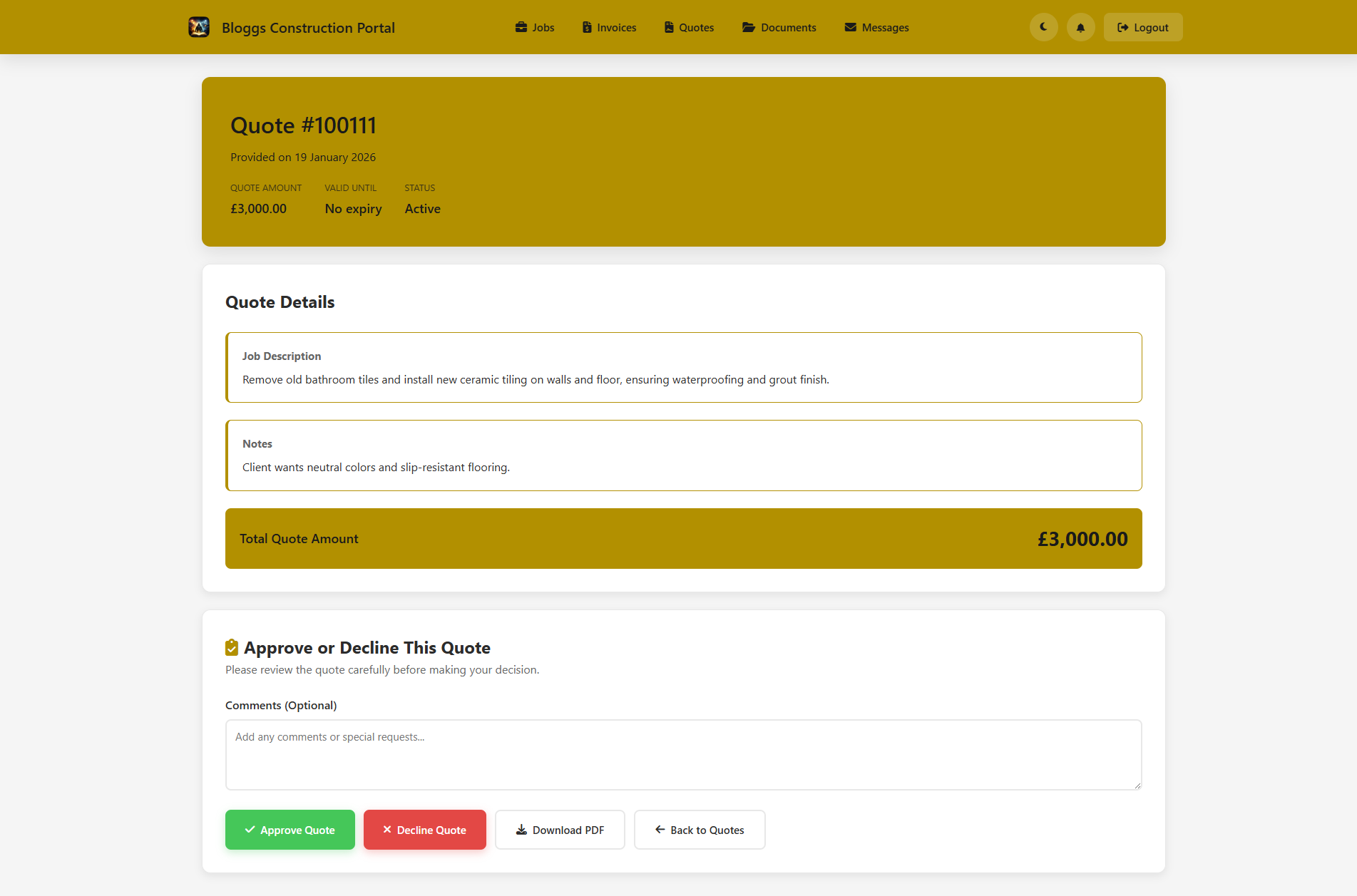
Approve or decline quotes with comments, download PDFs, pay invoices, or submit new job requests directly.
They track progress
Job updates, files, dates, locations, assigned crew, and shared notes appear in the portal as work moves forward.
Documents stay organised
Quotes, invoices, certificates, reports, photos, and customer-uploaded files sit in one searchable space.
Notifications keep things moving
Email, in-app, and push notifications help customers respond faster while your team sees it instantly.
What customers can actually do
More than a place to open a quote. A proper customer workspace that keeps service history, current work, communication, documents, and next actions together.
- See a live account dashboard - active jobs, upcoming work, pending quotes, unpaid invoices, and recent activity
- Request new work - submit service requests directly and track request status
- Track jobs in detail - status, dates, location, updates, shared notes, files, and full job history
- Review quotes properly - line-item detail, comments, approval or decline actions, and PDF downloads - or let customers accept via a shareable link with no login at all using Interactive Quotes
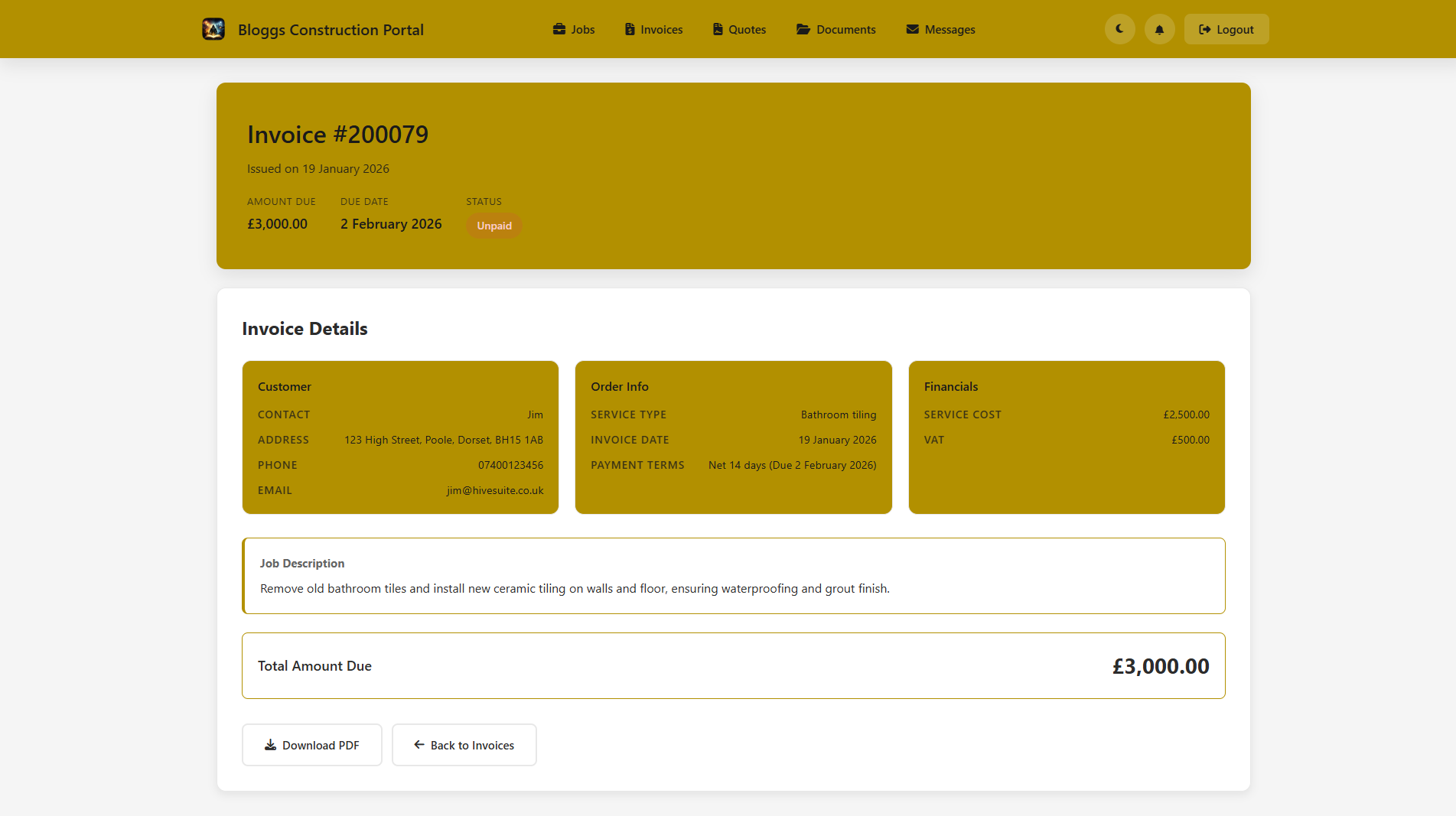
- Handle invoices end to end - view status, due dates, PDFs, and pay online when payments are enabled
- Search documents and upload files - certificates, warranties, reports, photos, plans, and customer paperwork
- Message your team - two-way conversations plus email, in-app, and push notification preferences
What you control behind the scenes
The portal is not all-or-nothing. Shape what appears, who gets access, and how much detail each customer sees so the experience stays useful without exposing the wrong things.
- Brand the experience - portal title, logo, and colour theme matched to your business
- Set global portal settings - control defaults for jobs, invoices, quotes, documents, and certificate visibility in one place
- Set granular permissions - control jobs, invoices, quotes, documents, payments, downloads, approvals, and more
- Filter what appears - limits, status filters, date ranges, and sort rules keep each portal focused
- Control customer actions - choose who can approve quotes, download invoices, upload files, or request work
- Use per-customer overrides - tailor access for individuals without changing the default for everyone
- Stay notified instantly - alerts when quotes are approved, invoices are paid, or customers reply
- Support more complex access - additional users, multi-company selection, and secure magic-link flows built in
- Keep the experience safe - secure logins, session controls, activity logging, and strict data isolation
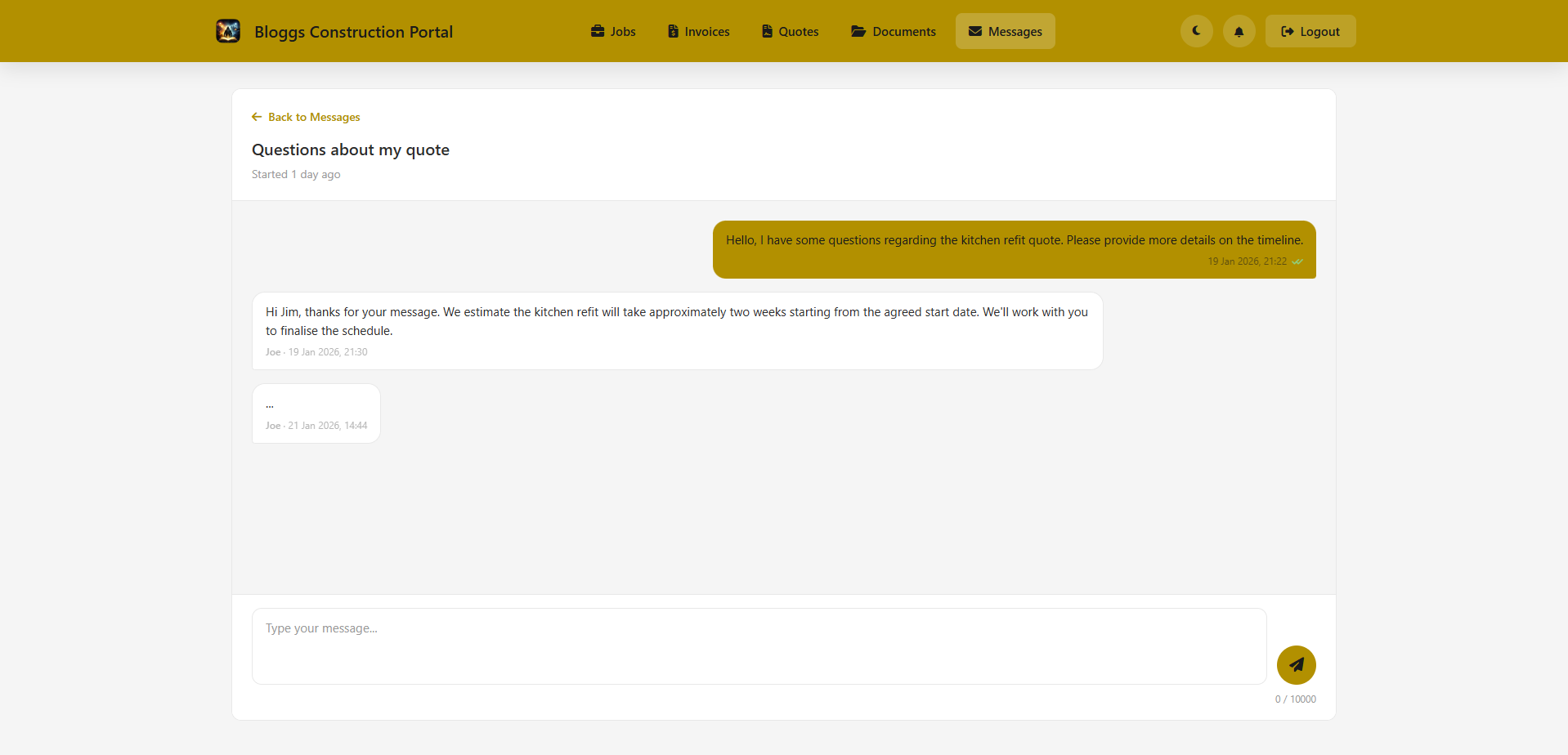
Most systems stop at one-off links. HiveSuite gives each customer a persistent account they can return to whenever they need something - checking upcoming work, requesting a job, reviewing a quote, paying an invoice, downloading a report, uploading a file, changing notification settings, or messaging your team. It behaves like an ongoing customer workspace, not a disposable transaction page.
recently added
What's new in the portal
The portal keeps improving alongside the rest of HiveSuite.
Job videos
Videos added to jobs and the Site Log play in the customer portal, including on iPhones and iPads.
Library documents
RAMS, warranties, method statements and standard certificates attached to a job can be shared to the customer portal.
What is still owed
Paying online asks for the total less any deposit paid and credit notes, and fully credited invoices show as credited, not unpaid.
Show on customer portal
Choose which jobs customers can see, with a default in HivePlanner Settings that you can override per job.
Have a question?
Customers can message you straight from a quote, and see the whole thread when they come back to it.
Site Log updates
Visit notes, photos and before-and-after comparisons from the Site Log can be shared with customers through their portal.
built-in protection
Security & control
Your customers' data is protected, and you're always in control of what they can see and do.
Secure logins
Individual credentials, password resets, first-login setup, and optional magic-link access give customers a secure way in without shared links.
Session & form protection
Session timeouts, secure cookies, CSRF protection, and login rate limiting help protect customer accounts and actions.
Data isolation
Each customer only sees their own records, with tenant-level isolation for a safer, cleaner experience.
Admin controls
You decide which customers get access, what appears in their portal, and which actions stay enabled at all times.
Audit trail
Customer activity is logged across views, approvals, downloads, and profile changes so your team has full visibility.
Included with every HiveSuite plan
The full portal capability ships with every plan from day one. You get secure logins, branding controls, permission settings, messaging, documents, and payment flows without paying extra for another product.
common questions
Frequently asked
Is the Customer Portal included in all plans?
Yes. The full Customer Portal is included with every HiveSuite plan from Solo upwards. There is no cut-down version or add-on fee. You get all the portal features - branding, permissions, messaging, documents, payments - from day one.
Do customers need to create their own account?
No. You enable portal access for a customer from within HiveSuite and they receive a secure invitation. They set up their credentials on first login. There is also an optional magic-link flow for customers who prefer passwordless access.
Can I control what each customer sees?
Yes. You can set permissions globally and override them per customer. You choose which sections appear - jobs, invoices, quotes, documents - and which actions are available, such as approvals, downloads, file uploads, or payment. You can also filter what appears using status, date range, and sort rules.
Can customers pay invoices through the portal?
Yes. When online payments are enabled, customers can pay invoices directly through the portal. Payment is handled via Stripe, which is included on all HiveSuite plans.
Can customers submit new job requests?
Yes. You can allow customers to submit service requests through the portal. The request creates a record in HiveSuite that your team can review and convert to a quote or job.
Is the portal branded to my business?
Yes. You set a portal title, upload your logo, and choose a colour theme. Customers see your branding throughout their experience rather than a generic HiveSuite interface.
Can multiple users access the same customer account?
Yes. Additional portal users can be added to a customer account. There is also support for multi-company selection if a contact belongs to more than one business in your system.
Is customer data kept separate between accounts?
Yes. Each customer only sees their own records. The portal uses strict data isolation so one customer cannot access another customer's jobs, invoices, or documents.