
HiveAssist helps you write better quotes, sharper reminders, and cleaner documents.
Rewrite job descriptions into quote-ready language, get a sensible pricing starting point with time and materials context, tighten invoice reminder emails, scan receipts into Finance Ledger, and build branded quote and invoice templates without starting from scratch.
Line-item generation
Generates quote line items from a short job description, with service type, time, materials, and a price starting point.
Multi-option packages
Builds good/better/best option packages for an interactive quote so the customer picks online.
Reminder drafting
Refines invoice reminder subject lines and email body based on the invoice context.
Receipt scanning
Extracts merchant, date, amount, VAT, and description from uploaded receipt images inside Finance Ledger.
Template StudioNew
Describe the change you want to a quote, invoice or purchase order template, or upload an existing PDF and HiveAssist builds a template that copies it.
Where it works today
HiveAssist is built into four live parts of HiveSuite
This is not a generic chatbot bolted onto the platform. HiveAssist is wired into the places where wording, speed, and consistency matter most.
1. Quotation assistance
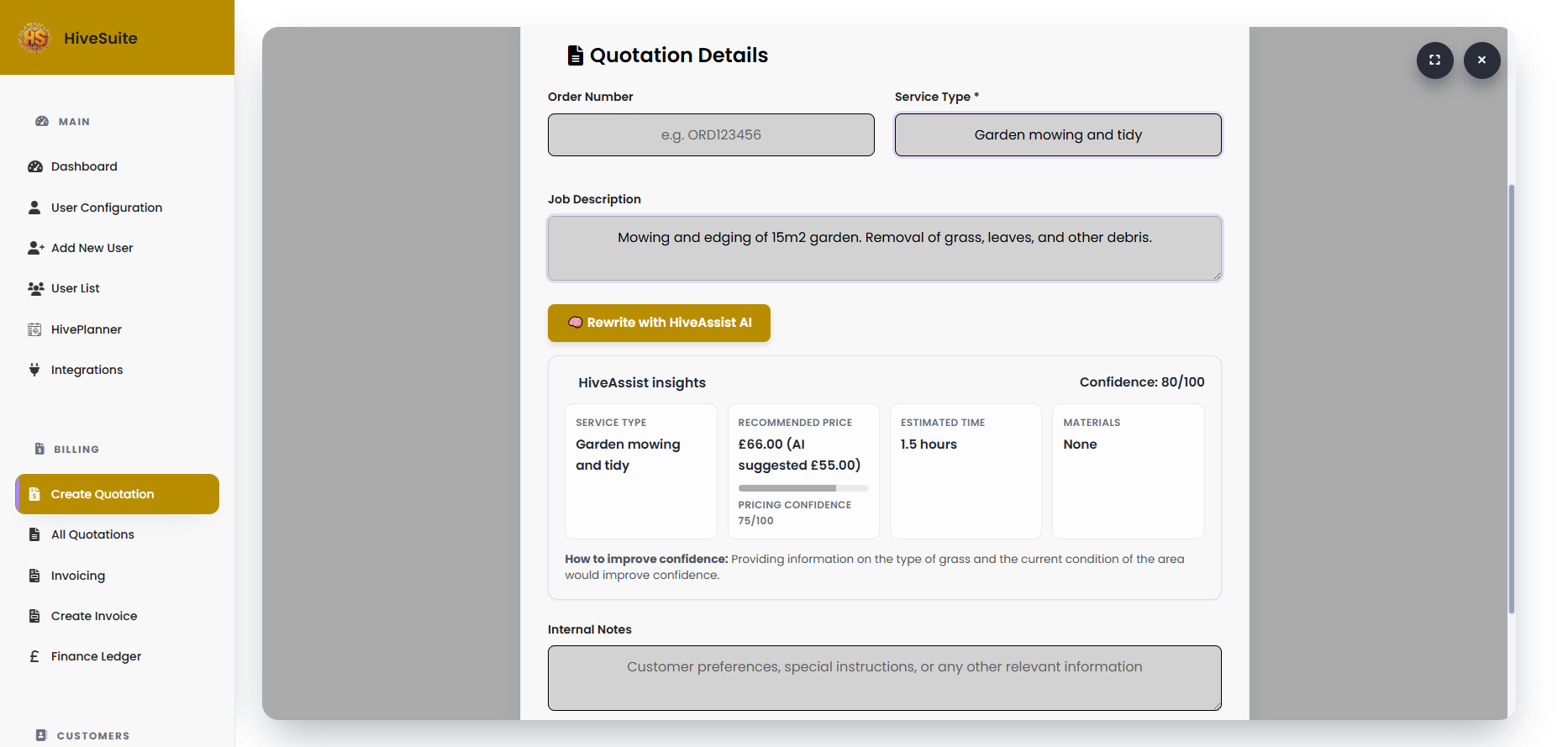
Inside HiveCRM quotation workflows, HiveAssist rewrites the job description into cleaner quote language and returns a service type, recommended price, estimated time, materials, and confidence cues before anything is applied.
2. Invoice reminder drafting
On the invoice reminder board in HiveCRM, it rewrites the draft email using the invoice number, amount, due date, and timing so your reminders stay polite, direct, and context-aware.
3. Finance Ledger receipt scans
Inside Finance Ledger, HiveAssist scans uploaded receipt images and pre-fills values like merchant, amount, VAT, date, and description so transactions are faster to log.
4. Quote and invoice templates
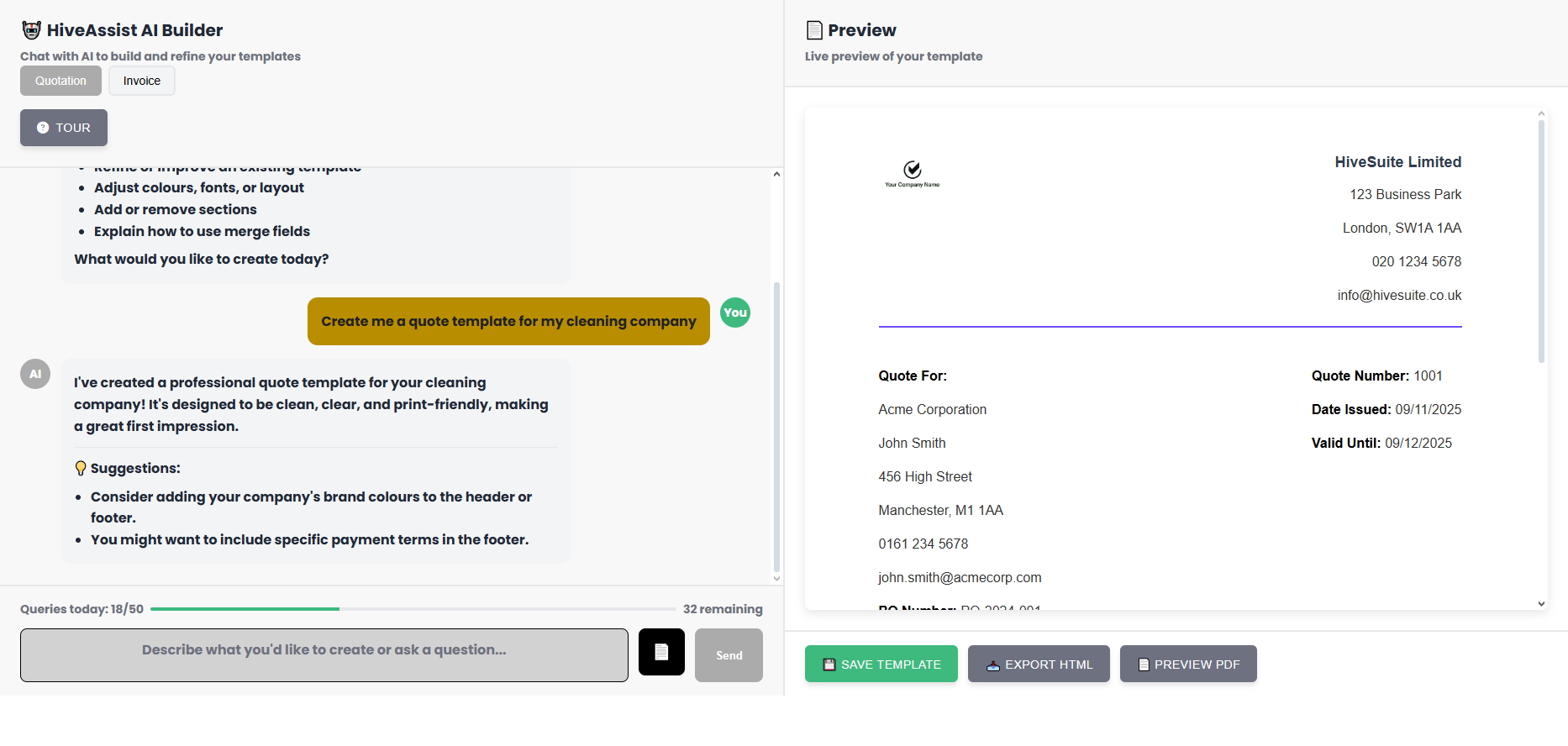
Inside Template Studio, HiveAssist designs or changes templates from a plain-English request ("use navy and gold", "add our bank details under the totals"), and can copy one of your existing PDF quotes or invoices, showing your PDF and its version side by side before anything is created.
Important: HiveAssist and HiveIntel are different. HiveAssist helps create and refine operational content inside workflows. HiveIntel answers questions about your live business data and reports.
Capabilities
What HiveAssist can actually do
Everything below is grounded in the current product rather than aspirational AI copy.
Rewrite rough job notes
Turns short or messy descriptions into clearer quote-ready wording suitable for a professional quotation.
Generate quote line items
Builds itemised line items from a job description - description, quantity, unit price - so you start a quotation with the structure already done.
Build multi-option packages
Generates good / better / best option packages for an interactive quote so the customer chooses online and accepts in one tap.
Suggest service type
Classifies the work into a short service label so quotes stay cleaner and easier to scan.
Estimate time required
Returns an estimated completion time in hours to help with pricing and scheduling decisions.
List likely materials
Suggests the main materials needed so you can sanity-check the job scope quickly.
Give a price starting point
Returns a suggested price based on the description, intended as guidance rather than an auto-approved final figure.
Warn when confidence is low
If the information is thin, HiveAssist surfaces a low-confidence warning and suggests how to improve the estimate.
Refine reminder emails
Rewrites invoice reminder body copy and suggests a concise subject line using the invoice details already in the workflow.
Extract receipt details
Pulls likely merchant, date, amount, VAT rate, and description from uploaded receipt images in Finance Ledger.
Build templates conversationally
Creates and refines quote and invoice templates through plain-English requests with live preview alongside the conversation.
Recreate a PDF as a template
Analyses an uploaded PDF, recreates the layout closely, and maps the design onto HiveSuite merge fields where possible.
Protect working templates
Template edits are checked for risky HTML or broken merge field patterns before saving, helping stop bad changes from shipping.
Built with guardrails
Useful AI should not take control away from you
Select what to apply
Quotation suggestions are presented for review so you can apply the description, service type, and price selectively rather than accepting everything blindly.
Confidence cues
If HiveAssist is not confident in the quotation estimate, it warns you and suggests what extra detail would improve the result.
Suggest, check, then apply
In Template Studio, HiveAssist checks its own suggestion for missing totals, fields that do not exist and images from other websites before you see it. Nothing changes until you press Apply, and Apply can be undone.
History you can go back to
Every template save is kept in History, so you can open an earlier version and restore it.
Plan and usage controls
HiveAssist in Template Studio is included with paid plans, with a daily request allowance shared across the workspace and shown as you work.
Availability
Access notes that matter
Quotation assistance
Built into quotation workflows in HiveCRM where HiveAssist can rewrite job descriptions and return pricing context.
Invoice reminder drafting
Available inside the invoice reminder board to improve reminder email wording before you send it.
Finance Ledger scans
Available in Finance Ledger where receipt uploads can be scanned and mapped into transaction fields before saving.
Template Studio
Template Studio is on every plan: drag-and-drop Design, Code, ready-made designs, version History and a Templates page with previews of every template.
HiveAssist in Template Studio
HiveAssist requests and copying a PDF are included with paid plans rather than free trials.
Template types
Quote, invoice and purchase order templates. Credit note templates are designed in Templates too.
FAQ
Questions people usually ask
Is HiveAssist the same as HiveIntel?
No. HiveAssist helps create or refine content inside workflows like quotations, reminders, and templates. HiveIntel is the reporting assistant that answers questions about live business data.
Can HiveAssist price jobs for me automatically?
It gives you a suggested starting point plus service type, time, materials, and confidence cues. You still review the result before using it as the final quoted price.
Can it build templates from an existing PDF?
Yes. In Template Studio, choose Copy my PDF and HiveAssist recreates the layout, colours and wording of an existing quote or invoice, with fields in place of the details. You see your PDF and its version side by side, and nothing is created until you press Create template. The PDF is not stored.
Does it change my template or quote without asking?
The workflows are review-first. Quotation suggestions can be applied selectively, and template changes are shown in preview before you save them.
Which template types does HiveAssist work on?
Quote, invoice and purchase order templates in Template Studio.
Do all plans get HiveAssist in Template Studio?
Template Studio itself is on every plan. HiveAssist requests and copying a PDF are included with paid plans rather than free trials, with a daily allowance shared across your workspace.
Try HiveAssist inside HiveSuite
See how much faster quoting, chasing invoices, and keeping documents on-brand becomes when the AI is tied to the workflow instead of bolted on top.
Start Free Trial30-day free trial - no credit card - cancel any time